Sésame logs Claude into your accounts, automatically, without ever showing it a password. For sensitive sites, you approve with one click. Everything stays on your Mac, in Apple's Keychain.
Free. No account. No server. macOS 13 or later.
Claude calls the tool sesame_login("edf") with a reason: “get the August invoice.”
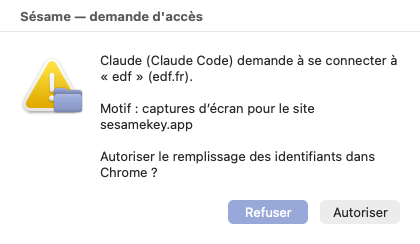
Claude wants to log in to edf.
Claude never receives a credential
The principle
Automatic by default: Sésame logs Claude in without you having to click anything, except on the sites you set to “Ask me.” Either way, no command ever returns a secret: Claude gets one of three possible answers, and nothing else. The password is typed into the page by Sésame, never shown.
done — the form is filled in, the session is opendenied — you said no, or access has been cut offfailed — the site resisted, without ever saying exactly whyHow it works
Download the archive, open it, and double-click “Install Sesame.” The installer introduces itself to Claude on its own and plants a small seed in the menu bar. The first time, macOS asks for a right-click then “Open.”
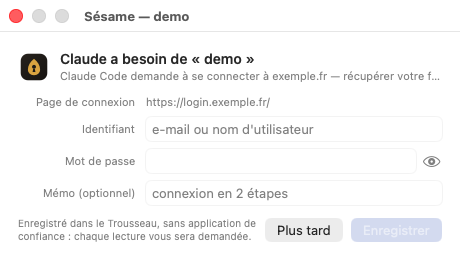
Click the seed, “Add a site,” type your username and password once. They go straight into Apple's Keychain, encrypted. Choose its rule: Automatic so you never have to approve again, or Ask me for sensitive sites.
On Automatic, Sésame fills the form in on its own in your browser: nothing to approve. On an “Ask me” site, a window asks for your go-ahead first. Claude carries on with its work.
Screen by screen
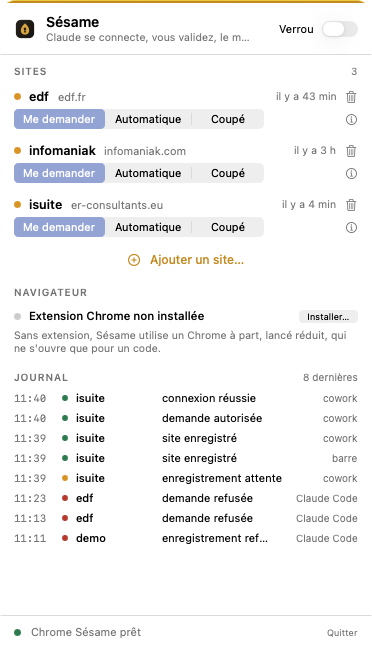
Screenshots of Sésame as it really is, not mockups. Three everyday windows, and a seed in the menu bar.
The app is in French for now; the screenshots show it.
sesame migrate-keychain.
The browser
Since version 136, Chrome refuses to let any program drive your everyday profile. It's a protection against malware, and Sésame respects it. Here's what that changes, and what we did so it barely shows.
chrome://extensions and turns on developer mode for you.extension/ folder, copy the ID shown under its name, paste it into Sésame, and click “Link.”Security
You choose: automatic, or approval every time for sensitive sites. And a Block button that cuts everything off, any time.
Sésame entrusts your secrets to the macOS Keychain, the same one that holds your Safari passwords and Wi-Fi keys. Apple's encryption, protected by your session and, on recent Macs, by the security chip.
No cloud, no Sésame account, no hidden sync. The secret only ever travels between the Keychain and your browser, on the same machine.
Automatic: Claude logs in without asking you anything. Ask me: every login goes through a Sésame window that states who, which site, why. You change your mind in one click, site by site.
Every request is recorded: who, when, which site, allowed or denied, succeeded or not. Claude can read it to report back to you. It cannot touch it.
In the menu bar, it cuts off every connection at once, whatever the site, for as long as you want.
Compatibility
Sésame speaks MCP, the open standard that assistants use to call tools. Claude understands it today. Others will follow, without changing anything about your passwords.
Control
| Site | Rule | Last access |
|---|---|---|
| OVH ovh.com | automatic | yesterday, 6:02 PM |
| EDF particulier.edf.fr | ask me | today, 9:28 AM |
| Taxes impots.gouv.fr | access cut off | 12 days ago |
Every line says who asked, for which site, and how you answered. Nothing is ever deleted from it.
FAQ
No. They live in Apple's Keychain on your Mac, and only leave it to be typed into your browser, on the same machine. Sésame has no server, no account, no analytics.
It has no command for that. Sésame only offers it “log in,” “list sites,” “read the log.” Even pushing hard, the only thing it can get back is “done,” “denied,” or “failed.”
Since version 136, Chrome refuses to let a program drive your everyday profile. So by default Sésame uses a separate-profile Chrome, which it launches itself, minimized, and only expands for a code. You can skip it with the Chrome extension (beta): it fills the form directly in your everyday Chrome, no second window.
For a site saved since 0.5.1, it doesn't: Sésame's Keychain helper creates and re-reads the item itself, silently, from the very first access. For an older site, one command settles it for good: sesame migrate-keychain — one Keychain window per site, you click “Always Allow,” and it's done.
From the seed in the menu bar: “Browser,” then “Install…” Sésame opens chrome://extensions and turns on developer mode for you; load the extension/ folder, copy the ID shown under its name, paste it into Sésame, and click “Link.” Sésame confirms once the connection is active. It's a beta: in your everyday Chrome, another extension with access to the page could in theory watch the keystrokes, just as it could watch you typing yourself.
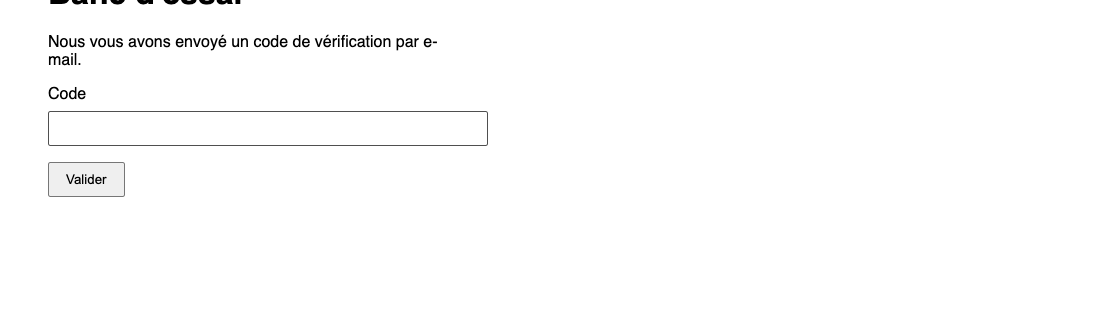
They stay in your hands. When a site asks for one, Sésame lets you know, shows “Waiting for your code” at the top of the page, and waits while you type it. The login only resumes once the code is accepted. That's by design: the second factor is you.
The secrets live in the Keychain, protected by your macOS session and disk encryption. Without your login password, they're unreadable. Still, change your passwords, as you would for any lost computer.
Nothing. Sésame is free and its code is open: anyone can check that it does exactly what's written here.
Download
One app, one drag-and-drop, and Claude logs in for you. Without ever knowing how.